Why has the web become so complex?
The complexity of the modern web and hypermedia systems
KO | EN
We once lived through the early-2000s line that even kids could make their own homepages, but web development today has become so difficult that the old line now rings hollow.
Since Tim Berners-Lee published the first website, the web has gone through immense change and growth in a short span of time. Early on, the web was a vast collection of documents. A user selected a particular web document on the client, the browser fetched it from the server, and displayed it on the screen. That was the purpose of the World Wide Web, and that was all users expected from it.
The web as an application
If I had to pick one decisive moment when the web’s complexity exploded, I would point to the moment it grew out of its early document-centered form and became an application. In the mid-2000s, Google Maps introduced all kinds of interactions, letting users zoom in, zoom out, and drag the map to load new areas. None of those interactions required refreshing the entire page. Once people began building web applications in earnest with Ajax (Asynchronous JavaScript and XML),[1] the web stopped being a system where the client simply received a finished HTML document from the server and displayed it.
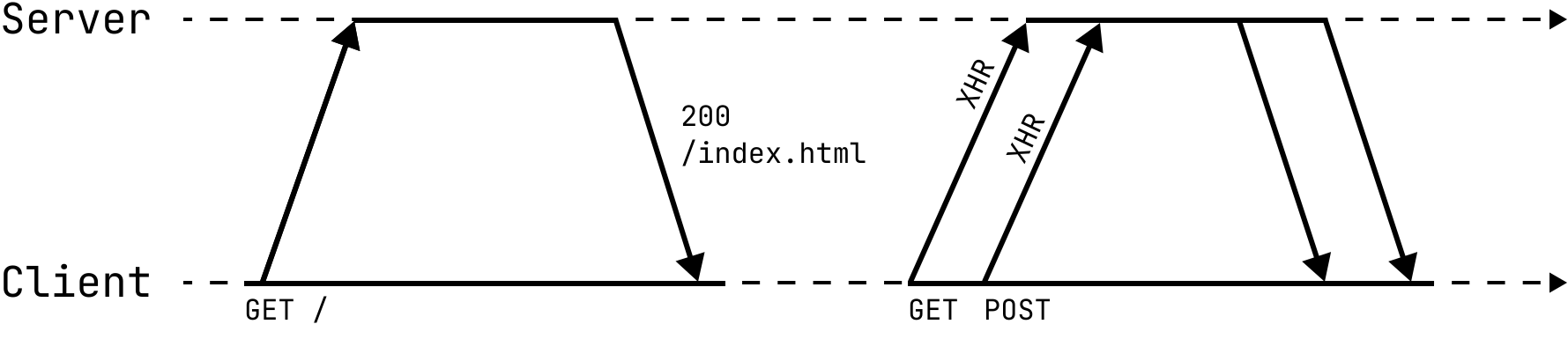 With Ajax, JavaScript can make asynchronous HTTP requests.
As web applications became widespread, the web split into frontend and backend, with the two sides communicating over JSON APIs. Most of the screens users saw were written in JavaScript, and many web publishers and Flash developers found themselves pushed to reinvent themselves as JavaScript developers. Companies began calling the programmers who built the client side of the web “frontend developers.”
SPA (Single Page Application)
The problems that make web backends hard did not change much in essence, but the problems that make frontends hard grew rapidly in both number and scale over a short period. Every time an interactive UI element was added to the screen, the amount of state the client had to manage grew exponentially, and frontend code naturally became more complex as well. From the mid-2010s on, frameworks and libraries poured out and competed with one another, all in the name of reducing the complexity of web applications.
They differed in design philosophy and core concepts, but they shared the same goal: make SPA development easier. An SPA is a kind of web application that loads an HTML page only once when the application is first opened, then handles all routing and state management with client-side JavaScript. Before that, every screen transition required reloading the whole page, so the screen often flickered and felt far removed from a native application. SPAs improved responsiveness and delivered a better user experience. The older style of web application, which used multiple pages, came to be called MPA (Multi Page Application), to distinguish it from SPA.
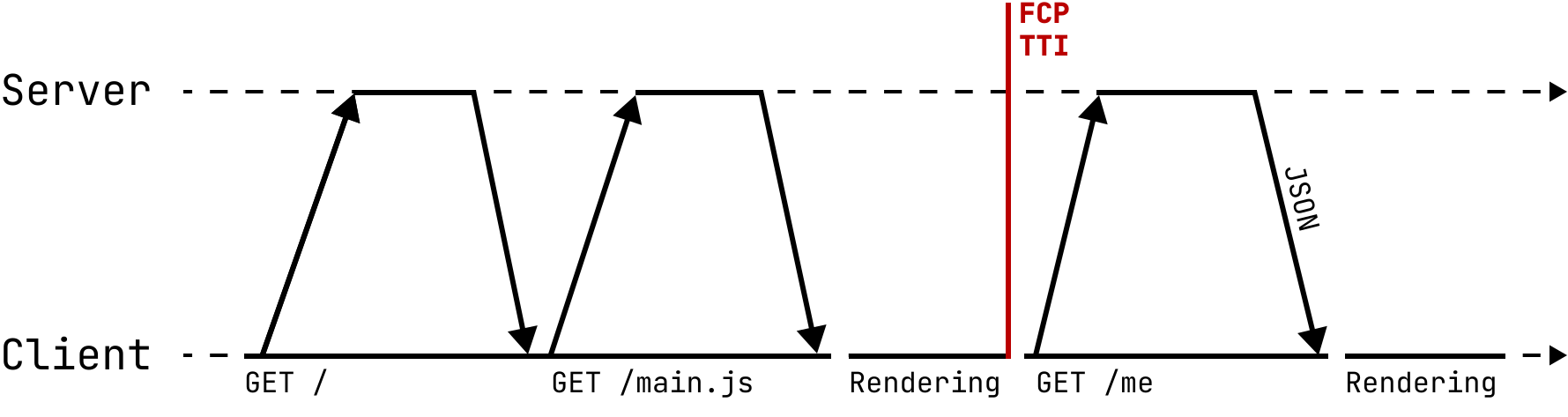 An SPA responds with an empty HTML file, and all later screen transitions are handled in JavaScript.
By then, hand-stitching JavaScript event handlers onto HTML and CSS and uploading the result over FTP had become something from before civilization. Programmers who first learned web development in the modern era came to regard the web that serves fully formed HTML from the server as backward. Many frontend developers began writing code in TypeScript, transpiling it into JavaScript, bundling it into a single file, and deploying that. A shaky JavaScript ecosystem filled up with package managers, build tools, and competing runtime implementations.
SSR (Server-Side Rendering)
SPAs brought a real advance in user experience. Before long, though, performance problems appeared. When JavaScript files grow large, SPAs cannot help taking a long time to load at the start. Until the JavaScript loads, the user cannot see any meaningful content in the application. The same was true for search engine crawlers, which meant SPAs also had an SEO (Search Engine Optimization) problem: they did not surface well in search results.
As a way around that, SSR, which renders HTML on the server and sends it down, came back into focus. The earlier SPA rendering model came to be distinguished from SSR as CSR (Client-Side Rendering). Because it serves HTML from the server, it can call to mind traditional web applications built with PHP or JSP. Modern SSR is different, though. It preserves the component-based framework ecosystem that grew up around SPAs, performs only the first render on the server, and leaves later state management and interaction to the client. The process by which the client loads the JavaScript containing state, event handlers, and internal framework logic, and then turns interaction back on, is called hydration.
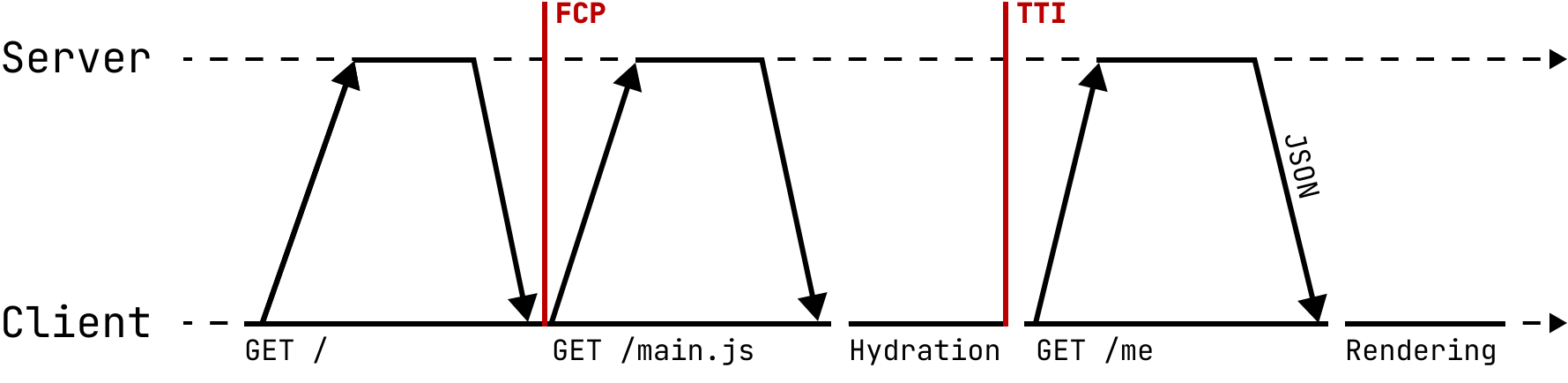 SSR improves the FCP metric by responding with prerendered HTML on the first request.
There are three main bottlenecks in this style of SSR. First, the server cannot render and respond to the client until all the data is ready. Second, the client has to receive all the HTML and JavaScript needed for hydration. Third, the user cannot interact with anything until hydration finishes on the client.[2] These bottlenecks happen in sequence, so the next stage cannot begin until the previous one is done. Progressive rendering was introduced to ease that. Instead of finishing all the content at once and responding in one shot, it sends whatever is ready first. By breaking a single request-response cycle into chunks that can be streamed, it eases the bottleneck. That lets the user see at least part of the screen sooner.
Efforts to move work that used to happen on the client back to the server are still ongoing. React Server Components (RSC) are React components that run on the server. Server components can directly access server-side resources such as the file system and the database. The server builds the component tree and streams it to the client in a serialized format, and the client reassembles it into the final UI. Because server components are not included in the client bundle, they do not require hydration. Some people argue, though, that RSC raises complexity instead, because developers have to keep track of which components run only on the server and which are delivered to the client. Opinion is still divided on RSC, but the broader movement is clear: the ecosystem is trying to minimize client overhead through a server-centered approach. The performance gains from cutting down the amount of JavaScript that runs on the client are real. Many frameworks are designing their SSR model out of the same concern. Seen that way, this may be the web correcting itself within its client-server structure.
The web as a hypermedia system
If we could go back to the moment when the web turned into an application, could we have chosen differently? The authors of Hypermedia Systems[3] emphasize hypermedia as the essence of the World Wide Web. HTML (HyperText Markup Language), the most popular hypermedia in use today, is often treated as an awkward technology we are forced to use when building web applications. Sadly, few people now discuss hypermedia with much seriousness, and the word itself is sometimes treated like late-twentieth-century jargon. But the web is still an excellent implementation of hypermedia. No matter how complex a web application becomes, if it is delivered through a standard browser, it cannot escape the fact that hypermedia is its foundation.
Hypermedia
Hypermedia is, literally, media such as text and images. What makes it hypermedia is that users can follow hyperlinks embedded in the media, branch nonlinearly from one place to another, and explore its contents.
The early concept of hypermedia was introduced by the engineer and administrator Vannevar Bush. In an essay published in The Atlantic,[4] Bush imagined a hypothetical machine called the Memex (Memory expansion), one that would let an individual store all records, knowledge, and experience. As he discussed what role science and technology should play after World War II, he wrote that a system was needed to share the vast body of wartime research and connect different fields to one another. At the time, there was no technology that would let a single person handle that much information, and Bush worried that people were spending too much time searching through existing knowledge. He proposed the Memex as a device to solve that problem.
The Memex is a desk-like machine that combines microfilm and a reader in one piece of equipment. One side of the desk has a translucent screen for scanning material. Books, handwritten notes, photographs, and other visual materials can be placed on the screen and stored on film by pulling a lever. Because the stored information is indexed automatically, a user can retrieve a particular item easily by entering its code. The Memex’s central feature is associative indexing, the ability to connect one piece of information to another. If two items are placed side by side and their linking code is entered, they become connected and can later be retrieved together along a single path. The Memex inspired the core ideas of hypermedia as later realized on the World Wide Web.
Hypertext is a kind of hypermedia. Ted Nelson, the sociologist who first coined the term, defined hypertext, with an emphasis on its nature as a non-linear document, as “discontinuous text that allows the reader to make choices by providing branches.”[5] By that definition, hypertext is a set of chunks of text connected by links and offering the reader multiple paths through them. Nelson also wrote that hypertext is best read on an interactive device.
Hypermedia has many advantages. It is a very simple way to build web applications, it tolerates changes to content and APIs, and it can take advantage of proven browser features such as caching. The authors focus on the anchor tag (<a>) and the form tag (<form>) as the essence of HTML as hypermedia. Anchor tags provide a way to move from document to document and from resource to resource. Form tags provide a way to change a resource. Those two features are the only routes by which users can interact with a server through HTML. The web has delivered a vast amount of functionality to people through just those two tags. That is strong evidence of what hypermedia can do.
REST (Representational State Transfer)
In 2000, Roy Fielding proposed a new network architecture style in his doctoral dissertation.[6] The REST architecture style introduced in the fifth chapter of that dissertation became widely known among people who had grown tired of SOAP-based APIs. There was a time when people argued fiercely over how to build a RESTful API and whether a given API was really RESTful. To bring up “true REST” now may feel like joining a war after it has already ended. Still, REST is fundamentally an architectural style for hypermedia systems, so it cannot be left out of a discussion of hypermedia.
The most innovative part of Fielding’s dissertation is the section on the uniform interface. The authors of Hypermedia Systems argue that the self-descriptive messages constraint within the uniform interface principle is the source of hypermedia’s flexibility and simplicity. Under this constraint, messages exchanged between client and server should contain all the information needed, so that the client can operate the application correctly just by reading the response. For example, suppose a user sends an HTTP request to the /posts/42 endpoint to read a particular post. The server might return a response like this.
{
  "id": 42,
  "title": "Hello World",
  "content": "This is a sample post.",
  "status": "Public"
}
The JSON response tells the user the title, content, and status of post 42. But it does not tell the user what they can do next. How would a user hide the post? The API author would have to specify in advance that hiding it requires a request to /posts/42/hide. Everything is implicit and depends on a contract outside the HTTP response itself. That feels closer to imitating RPC than to a REST API.
Today, the term “REST API” makes people picture an API that uses a set of carefully chosen HTTP methods, accepts requests against URIs that point to specific resources, and returns suitable status codes plus JSON data. But JSON APIs and Ajax did not exist when Fielding wrote his dissertation. He was explicit that APIs should be hypertext-driven.[7] If an API returns hypertext, in this case HTML, as he argued, it can construct a much more self-descriptive message.
<html lang="en">
<body>
  <h1>Hello World</h1>
  <div>This is a sample post.</div>
  <div>ID: 42, Status: Public</div>
  <p>
    <a href="/posts/42/hide">Hide</a>
  </p>
</body>
The user who receives the HTML response immediately learns not only the information about the post, but also that hiding the post is possible and that the /posts/42/hide hyperlink is the way to do it. By presenting both information and means of control at the same time, the information itself becomes an affordance that leads the user toward the next action. This flexibility shows even more clearly when a new feature is added to the application. If you want to add a delete function, you can simply add a hyperlink for deleting the post to the HTML response. If the response were JSON, you would have had to write a new section in the API documentation. The client does not need to know the promised response schema in advance. It only needs to know how to render HTML. That is only possible when the server’s response format is hypertext. The browser is an astonishingly sophisticated hypermedia client, and it already knows how to handle hypertext.
The self-descriptive messages constraint is closely tied to the HATEOAS (Hypermedia as the Engine of Application State) constraint that Fielding proposed alongside it. HATEOAS treats a network of linked web pages as a state machine, and requires the application to work by letting the user move to the next state through hyperlinks. That is exactly how the earlier example works. If you follow this constraint, the application state can be navigated correctly even when the user is a machine rather than a human. HATEOAS is also what the phrase “Representational State Transfer” directly points to.
 Hypermedia is a state machine.
That does not mean it makes sense now to lecture everyone that all web applications must follow HATEOAS, or to rage that most so-called REST APIs in the world are not RESTful at all. Language is social, and the meaning of REST has already shifted. When someone says they offer a REST API, nobody expects a hypertext response or HATEOAS. REST was an architectural style for hypermedia from the start. If you want to talk about REST, you have to talk about hypermedia first. Without that, there is no good reason to insist on “true REST.”
Disillusionment and possibility
I sympathize emotionally with the claim that “the web has become needlessly too complex,” but I have a hard time really agreeing with it, because the claim usually seems to come from fatigue with fast-moving web technology trends or disillusionment with the JavaScript ecosystem.
I do not want to criticize the technical decisions the web ecosystem has made over the last twenty years simply because the web’s complexity rose so sharply in a short time. Some people say the web became complex because it began overusing JavaScript in the 2010s. But the cause was not JavaScript itself. The cause was that users’ expectations for UX rose to the point where JavaScript became necessary. People spent most of their time at computers on the web, and they wanted the web to support the kind of interaction native applications did. After smartphones became commonplace, companies that lacked the resources to build mobile apps wanted their websites to look and feel like native apps on mobile devices. HTML as hypermedia could not fully absorb those demands for interaction. In that situation, implementing most of a web application in JavaScript was a natural choice. It is easy to criticize legacy decisions after the fact, but every technical decision carries the trade-offs people saw at the time.
Still, it is a shame that hypermedia was set aside so quickly, given how solid its design is and how much potential it holds. The authors of Hypermedia Systems propose htmx as a framework for building modern hypermedia web applications. Rather than replacing the web’s hypermedia system in order to get past HTML’s limits, they thought about how to extend it. With htmx, an HTML response from the server can update only a particular element instead of replacing the whole page, and it can produce fairly fine-grained interactions without writing JavaScript. To be honest, though, web applications built with htmx behave reasonably, but they still feel rough in places. They do not suit applications where users frequently change state, and some of their implicit attributes are hard to predict. Even so, it is striking that, roughly ten years after React was introduced, there is still an attempt to approach hypermedia this seriously, and that it has produced results that are practical in their own way.
The web ecosystem is still changing. Concepts like SPA and SSR, which became central to the modern web, have not been around all that long. The problems SSR is trying to solve today are somewhat different from the problems of hypermedia systems, but as SSR grows more sophisticated, you can start to see some overlap. If hypermedia really is a model well suited to the way the web works, its core ideas will return to web applications one way or another. Form follows function, after all.
Hypermedia systems are a boring technology that uses the web exactly the way everyone already knows it works. Nothing magical happens here. The client makes a request, the server sends a response, and the client renders it. That is all. If there is any magic, it is the browser itself. And the World Wide Web already gives us the whole infrastructure for it.
I want to keep rooting for that boring technology.
- [1]
Jesse James Garrett, “Ajax: A New Approach to Web Applications”, 2005.
- [2]
Dan Abramov, “New Suspense SSR Architecture in React 18”, 2021.
- [3]
Carson Gross, Adam Stepinski, Deniz Akşimşek, “Hypermedia Systems”, 2023.
- [4]
- [5]
Ted Nelson, “Literary Machines”, 1981.
- [6]
Roy Fielding, “Architectural Styles and the Design of Network-based Software Architectures”, 2000.
- [7]