Turning smartphones into motion controllers for PCs
Zap, a library for multi-device applications
KO | EN
As the number of devices a single user owns keeps growing, so does the desire to tie them together more organically. I regularly use a MacBook, two smartphones, an iPad, and an Ubuntu desktop, and once you step outside Apple’s Universal Control, getting devices across different platforms to work together is not easy. Mobile devices in particular carry a wealth of sensors, but when you are using a PC you usually cannot use any of them at all. Those sensors are too valuable to leave stranded on a mobile device. If the various sensors built into mobile devices could be used from other machines, we could build richer user experiences. What if you could use a smartphone as a motion controller for a PC?
In the video above, the smartphone acts as a controller for a game running on a laptop. By tilting the device with its accelerometer, you can steer the car, and you can accelerate or brake with buttons. I built the application programming library Zap out of a desire to make it easy for developers to build multi-device applications in which several devices are tightly coupled in this way.
Zap was the result of my capstone project. These days, when people say they are doing a capstone project, they usually mean building a finished web service, with a frontend written in React, a backend written in Java as a Spring Boot server, and deployment to AWS. But the web was something I had already done to death over the last few years, and I did not have some service idea that might lead to a startup, so I wanted to choose a topic completely different from what I had studied so far. In that sense, Zap was also a chance for me to study a new area.
The Zap library
Zap’s basic idea is to help developers easily stream data from data sources on a mobile device to a remote device. The first paper I read after joining the lab was Tap: An App Framework for Dynamically Composable Mobile Systems, and the Tap framework introduced there aims to share data sources between mobile devices. What disappointed me as I read Tap and the many multi-device computing framework papers it cites was that none of them came with a solution you could actually use right away. When a good idea survives only in a lab and in papers, that is a loss for researchers, developers, and users alike. So Zap set out to improve and extend Tap and provide a solution that anyone could actually use. To do that, I worked from two main requirements.
First, it needed to provide an abstract interface that makes it easy, at the application level, to share a device’s resources with a remote device. To share data with another device, application developers ordinarily have to deal with network communication and multithreading themselves. The point was to abstract that away behind a simple API. That lets developers handle data from remote devices much as they would data from the local device.
Second, devices such as PCs, TVs, and kiosks needed to be able to join the network, not just mobile devices. Most PCs, TVs, and kiosks either do not have the same hardware mobile devices do, such as sensors and touchscreens, or have much less of it. So to create genuinely useful multi-device user experiences, you need to combine devices that have those capabilities with devices that do not.
Here is a piece of Kotlin code that sends data from an Android device’s accelerometer sensor to a remote server. It creates a client that points at the server device’s IP address and defines a callback method that is called whenever the sensor values change, sending the accelerometer data to the server.
class MainActivity: AppCompatActivity(), SensorEventListener {
  private lateinit var zap: ZapClient

  override fun onCreate(state: Bundle?) {
    zap = ZapClient(InetAddress.getByName(...))
  }

  override fun onSensorChanged(event: SensorEvent) {
    if (event.sensor.type == Sensor.TYPE_ACCELEROMETER) {
      val (x, y, z) = event.values
      zap.send(ZapAccelerometer(x, y, z))
    }
  }
}
The server that receives data sent by the client, the Android device, is just a simple desktop program. The Node.js application below receives accelerometer data and prints a log. By abstracting the communication procedure like this, I made it possible for developers to exchange data with remote devices with only a small amount of code.
(new class extends ZapServer {
  onAccelerometerReceived(info: MetaInfo, data: ZapAccelerometer) {
    console.log(`Data received from ${info.dgram.address}:
      (${data.x}, ${data.y}, ${data.z})`);
  }
}).listen();
Because the Zap network basically follows a client-server model, it can keep the overall structure of an application simple. The structure of the model also makes it natural to support 1:N connections, where a single device is linked to several others, and device connectivity does not require any cloud infrastructure.
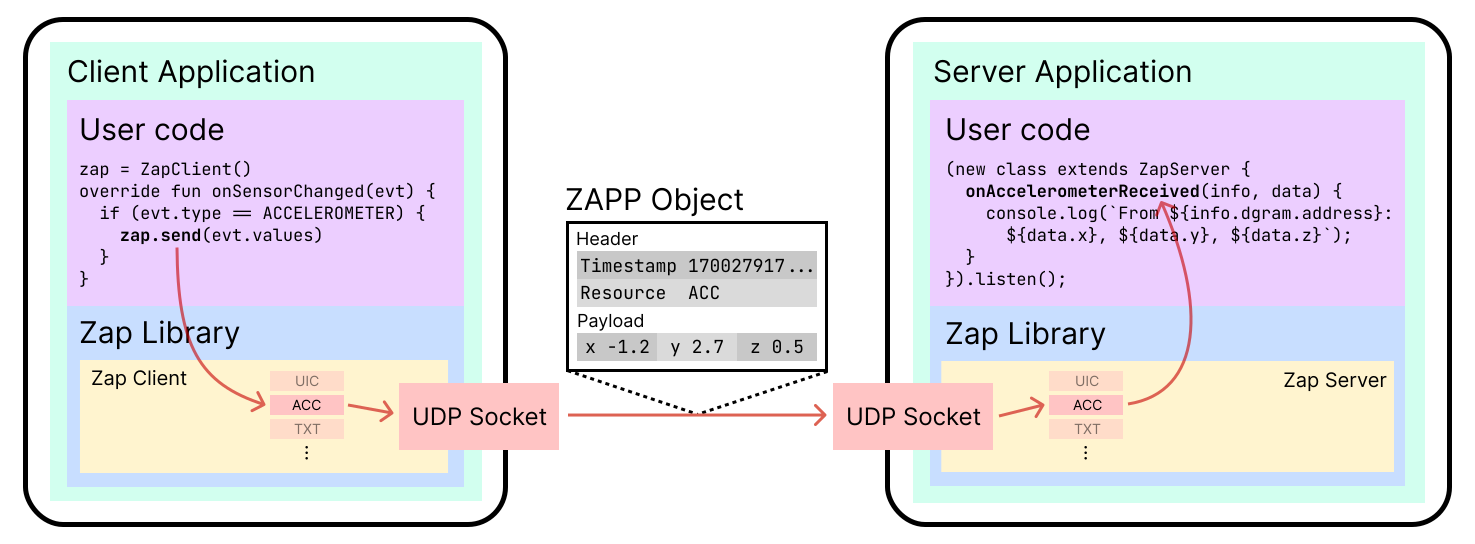 The Zap client-server model.
The figure above shows a client sending its accelerometer values to the server in real time. Zap was designed around IP-based communication so it can benefit from high bandwidth. That means a client first needs the server device’s IP address before it can connect. The Tap framework targets communication between mobile devices, so it exchanges IP addresses over NFC and then switches to IP communication. But the kinds of devices Zap targets are unlikely to support NFC, so I had to take a different approach. Strictly speaking, the connection mechanism is not something the library itself has to provide, but if Zap was going to prove useful in a real application development environment, it was worth thinking through.
There are various ways to do this, but in general you would probably choose to display a QR code containing the server’s IP address on the server device’s screen and have the client scan it. (All of the example applications built with Zap use this method.) Or, depending on the situation, you could connect devices through physical contact with NFC, as Tap does, or broadcast connection requests to nearby devices over BLE. Once the devices are connected, the client’s data can be sent to the server over UDP sockets. Incoming data is passed to callback methods defined on the server side according to its type.
The ZAPP communication protocol
When people build multi-device apps that let Android devices communicate with each other, a common approach is to treat it as an extension of IPC and share binders with remote devices. But Zap’s remote devices might be a MacBook running macOS, a Linux desktop, or a Windows kiosk rather than another Android device, so I needed something more general. Since I had to send fast-changing sensor data quickly, using UDP sockets was an easy choice.
The question was how to pack the data into datagrams. Accustomed to HTTP, I tried putting JSON in them without much thought. But encoding the data objects obtained from the sensors as JSON, sending them, and decoding them back into objects was far too slow, on the order of tens of milliseconds. Even if I stored them as simple delimiter-separated text, the datagrams would still become too large because each character would take at least one byte. BSON and Protocol Buffers did not feel right for this purpose either. In the end, to achieve high performance, I defined my own network protocol on top of UDP: ZAPP (Zap Protocol).
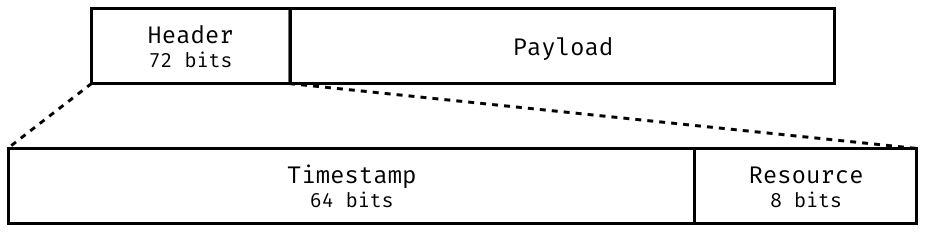 The layout of the header part of a ZAPP object.
The first 9 bytes of a ZAPP object make up the header. If ordering matters, the application can guarantee order using the 8-byte timestamp field in the header. The payload that follows contains the actual values, and its encoding varies by resource type. You can tell how the payload is encoded from the 1-byte resource field in the header.
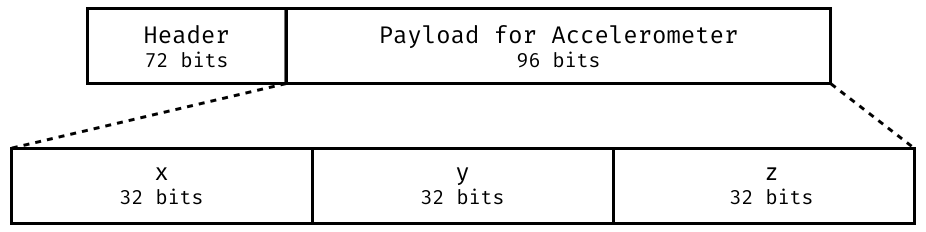 The layout of the accelerometer data payload in a ZAPP object.
If, for example, the value of the resource field in the header is ACC, it indicates accelerometer data, and tells you that the payload is encoded as 4 bytes each for the x, y, and z axes, 12 bytes in total. Zap supports motion sensors such as the accelerometer, environmental sensors including the light sensor, and resources such as UI events, text, and geopoints.
This came at some cost in flexibility of data format, but once I applied ZAPP, sending 100,000 ZAPP objects from client to server yielded average end-to-end performance, from encoding through decoding, of under 0.03 ms per object.
Multi-device applications
To show that the Zap implementation could be useful in practice, I built a few multi-device applications with it, including the motion controller shown earlier. The first example uses a smartphone as a presentation remote.
You can see it using the on-screen button UI, and you can also move slides with the side volume buttons.
Another example is an application that shares characters written with a pen on a tablet to a laptop. Ordinary laptops usually do not have touchscreens, so pairing them with a mobile device can work very well. It is especially useful when you need to write Chinese characters or kana.
This example is a modification of ML Kit Digital Ink, so character recognition happens on the tablet itself. But if you extend the idea in the opposite direction, distributed computing is also possible, where GPU-heavy work runs on a high-performance machine and the mobile device only receives and uses the result. Zap’s main goal is to combine mobile devices with PCs, but mobile-to-mobile or PC-to-PC integration works just as well.
The Zap library and the example applications are still only at the prototype stage, so there is plenty left to think through. First, the UDP datagrams need encryption, and there has to be a permission and authentication process for client devices. The server also needs to be improved so it can manage threads dynamically according to the number of connected clients, which would increase throughput. On top of that, I need a way to deal with cases where the server can no longer process the data it receives from clients. The current Zap implementation uses a push model, and when the buffer fills up and the server cannot keep up, any additional incoming data is dropped. When I tried the motion controller I built earlier on a laptop with weak performance, the delay was noticeable enough to feel, so one possible improvement would be to let the server set the processing rate outright.
Zap was a fairly challenging project for me, but it ended well and won a prize for excellence. You can find the implementation and all the examples at github.com/zap-lib, and the documentation at zap-lib.github.io.