How railway timetables became Unix time
Time and computer science
KO | EN
Dealing with time in computer science is a fairly grueling task. Software engineers suffer in particular from the gap between the time systems we intuitively understand in daily life and the time systems we never consciously notice. In this article I want to look at time systems like solar time and atomic time, and explain how computers handle time.
The sun’s time
 Stanford University Libraries (CC0)
Up until the early 19th century, each region used its own local mean time (LMT). Because local mean time is a system that takes the moment the sun reaches its highest point in a given place as its reference, the time in use differed by longitude, by region, by city, and by village. Traveling from London to Oxford, for instance, set the clock forward by five minutes; going to Leeds set it forward by six. Even so, it caused no trouble. The horses pulling carriages and the wind driving ships were slow enough that a difference of a few minutes didn’t matter.
But once the steam engine appeared and railways were laid to connect the regions, travel time shrank dramatically and accurate time became important. If a train that leaves London at 8 o’clock sharp arrives in Oxford exactly an hour later, by Oxford’s clock it arrives at 8:55, not 9:00. There’s a five-minute gap from the engineer’s clock, which is set to London time. If the train sets off again for London at 9:10 by the engineer’s clock, the passengers in Oxford miss it by five minutes. A passenger could miss a train over a few minutes’ difference, and an engineer could collide with another train over a few minutes’ difference. In 1840 the Great Western Railway adopted London’s Greenwich Mean Time (GMT) across all of its stations and timetables, and in 1847 the Railway Clearing House[1] recommended that every railway company in Britain adopt GMT as soon as possible.[2] Eventually GMT came to be used as standard time throughout Britain.
GMT is the time observed at the Greenwich Observatory. The moment the sun reaches its highest point over Greenwich is set as noon, and the span from then until the sun reaches its highest point the next day is divided into 24 hours. The Earth, then, rotates 360 degrees over those 24 hours, turning 15 degrees per hour. So the meridian passing through Greenwich is taken as the reference for 0 degrees longitude, the prime meridian, and dividing the Earth into 15-degree slices puts a one-hour difference at every 15 degrees of longitude. Regions divided up on this basis are called time zones: London sits at GMT+0, Berlin at GMT+1, an hour ahead of London, and Seoul at GMT+08:30, eight and a half hours ahead. Several imperial powers wanted the meridian through their own capital to be the prime meridian, but GMT, already in use in many places, became the reference for Universal Time.
The reason for the word “mean” is that it doesn’t take exactly 24 hours from the moment the sun reaches its highest point today to the moment it does so tomorrow. The Earth orbits in an ellipse, the sun isn’t at the center of that ellipse, the Earth’s orbital speed increases as it nears the sun and slows as it moves away, and the Earth’s axis is tilted 23.5 degrees. So if you use apparent solar time, which always takes the moment the sun reaches its highest point as exactly noon, the length of a day varies by a few seconds every day. The system that averages apparent solar time to correct for this error is called mean time. In other words, saying a day is 24 hours means a day is on average 24 hours. I described GMT earlier as if it were observed as apparent solar time, but note that it’s actually a mean time derived from apparent solar time.
The atom’s time
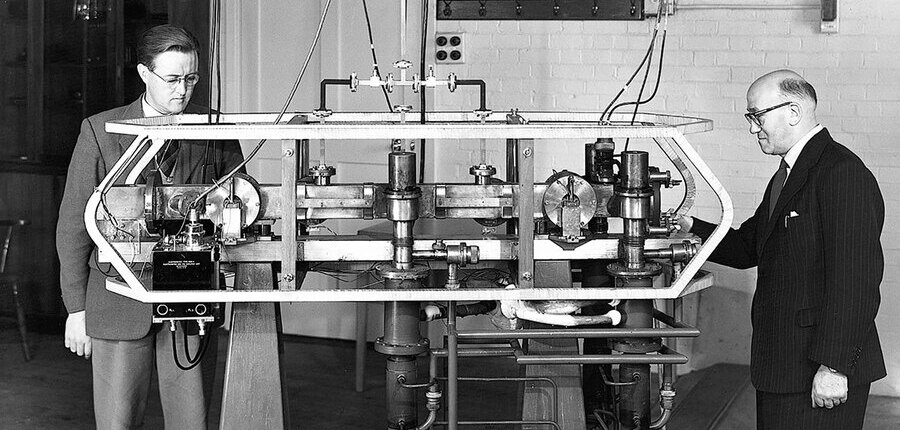 UK National Physical Laboratory (CC0)
Time systems based on the sun, like GMT, are collectively called solar time. In the 20th century, though, we learned that the Earth’s rotation speed is irregular because of tidal forces. Until then, the second had been defined as 1/31556992 of the 31,556,992 seconds it takes the Earth to orbit the sun once, which means that definition was irregular. Then in 1955 an atomic clock appeared that used caesium-133, the only stable isotope of caesium (
Because the basis for the second changed from solar time to atomic time, GMT, the reference for Universal Time, also needed to be reconsidered. So Coordinated Universal Time (UTC), based on atomic time, came to be used in place of GMT. The reason the abbreviation is UTC is that it was a compromise between the English-speaking world, which pushed for CUT (Coordinated Universal Time), and the French-speaking world, which pushed for TUC (Temps Universel Coordonné): they adopted UTC, the same letters in a rearranged order.[4]
UTC and GMT differ only at the sub-second level, and UTC also takes as its prime meridian a meridian almost indistinguishable from the Greenwich one, so in everyday use the two are used interchangeably. UTC’s time zones, like GMT’s, put London at UTC+0, Berlin at UTC+1, and Seoul at UTC+08:30. Each country’s standard time zone, however, doesn’t follow this exactly but is adopted at the country’s own discretion. Paris sits in the UTC+0 zone but uses UTC+1 under Central European Time (CET), and Seoul sits at UTC+08:30 but uses UTC+9 under Korean Standard Time (KST). Countries that use summer time, or daylight saving time (DST), use yet another time zone depending on the season.
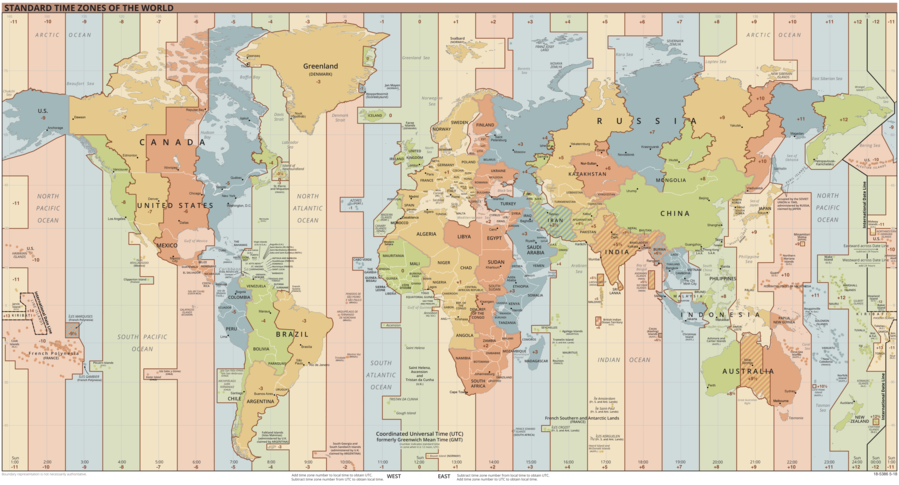 US Central Intelligence Agency (CC0)
As mentioned earlier, because the Earth’s rotation speed is irregular, an error builds up between solar time, based on the motion of celestial bodies, and UTC, based on atomic time. When the error between solar time and UTC exceeds 0.9 seconds, the International Earth Rotation and Reference Systems Service (IERS) adds or subtracts one second from UTC to correct it, and this is called a leap second.[5] In the past, when solar time was central, the whole time system was affected by the Earth’s rotation speed, but now time can be corrected with leap seconds by exactly as much as the rotation speed has changed. A leap second is applied at 23:59:59 on June 30 or December 31 in UTC, and it’s added by expressing the moment one second later as 23:59:60 rather than 00:00:00. The IERS normally announces a leap second six months in advance.
The operating system’s time
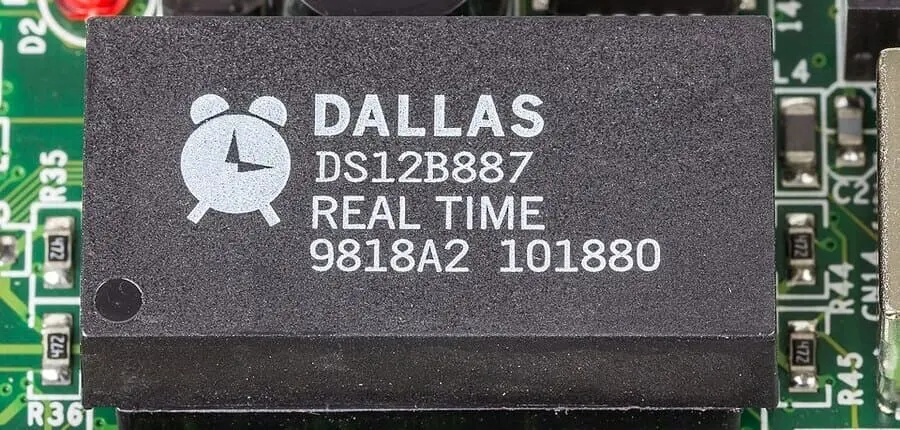 Raimond Spekking (CC BY-SA 4.0)
Computers measure time using a hardware device called the RTC (Real Time Clock). Almost every electronic device today that needs time information contains an RTC. Most RTCs use a quartz oscillator: when voltage is applied to a quartz crystal, it vibrates at a frequency of 32.768 kHz, and that serves as the reference for one second.[6] Because it has its own separate power source, the RTC can keep measuring time even when the computer is off.
At the operating-system level, the time set globally across the computer system is called system time. Running the timedatectl command on Linux shows information like the system’s local time, UTC time, RTC time, and time zone.
$ timedatectl
                      Local time: Sun 2022-01-02 00:00:00 KST
                  Universal time: Sat 2022-01-01 15:00:00 UTC
                        RTC time: Sat 2022-01-01 15:00:00
                       Time zone: Asia/Seoul (KST, +0900)
       System clock synchronized: yes
systemd-timesyncd.service active: yes
                 RTC in local TZ: n
Unix-like operating systems manage system time by how many seconds have passed since 00:00:00 on January 1, 1970, in UTC. This is called Unix time, POSIX time, or epoch time. The epoch refers to midnight on January 1, 1970, UTC. The reason it’s this particular date isn’t all that remarkable. Dennis Ritchie, who developed the Unix system at Bell Labs, said he simply decided to pick an origin date that wouldn’t overflow for a while and happened to land on January 1, 1970.[7]
Unix time is generally expressed as a timestamp in seconds or milliseconds. For example, the timestamp for 00:00:00 on January 1, 2022, UTC is 1640995200. Because this timestamp expresses a specific instant regardless of time zone, it also corresponds to 01:00:00 on January 1, 2022, in CET (UTC+1), and to 09:00:00 on January 1, 2022, in KST (UTC+9). 2022-01-01T00:00:00Z, 1640995200 (seconds), and 1640995200000 (milliseconds) are all timestamps for the same moment. The standard specification for date and time data is defined in ISO 8601,[8] and the internet standard RFC 3339 defines it based on ISO 8601.[9]
Unix time using a 32-bit integer can only represent up to 2,147,483,647, so it overflows once it passes 03:14:07 on January 19, 2038, UTC. This is called the Year 2038 Problem (Y2K38). 64-bit systems already use a 64-bit integer for Unix time, but older systems need attention.
IEEE Std 1003.1-2017, which defines a standard interface and environment for operating systems, defines “Seconds Since the Epoch” as “a value that approximates the number of seconds that have elapsed since the Epoch.” You can derive Unix time from UTC with simple arithmetic alone.[10]
tm_sec + tm_min*60 + tm_hour*3600 + tm_yday*86400 +
    (tm_year-70)*31536000 + ((tm_year-69)/4)*86400 -
    ((tm_year-1)/100)*86400 + ((tm_year+299)/400)*86400
The reason Unix time only approximates UTC rather than mapping one-to-one is that it doesn’t account for leap seconds at all. This kept the implementation simple, but it creates a problem: time can’t be guaranteed to increase monotonically. In practice, even when a leap second is added to UTC, a day in the system is exactly 86,401 seconds. So the timestamp for 23:59:60 on December 31 is the same as the timestamp for 00:00:00 on January 1. In other words, the same time is passed through twice, and at the sub-second level time can even run backward.[11]
Even setting leap seconds aside, system time doesn’t necessarily increase monotonically. Even very simple Python code can run into trouble. Take a case where, while the program is running, the user turns the system’s clock back by 12 hours, so the program’s running time is wrongly measured as taking -12 hours.
import time

start = time.time() # 2022-01-01T19:00:00
do_something() # arbitrarily turns the system clock back to a past time
end = time.time() # 2022-01-01T07:00:00

print(end - start) # took -12 hours to run
Fortunately, the standard library in most languages provides an API for using a monotonic clock. A monotonic clock doesn’t point to the current time; it generally points to how many seconds have passed since the operating system started, so it guarantees that time won’t run backward. Python’s standard library module time has a monotonic function.[12]
import time

start = time.monotonic() # 2022-01-01T19:00:00
do_something() # arbitrarily turns the system clock back to a past time
end = time.monotonic() # 2022-01-01T19:01:00

print(end - start) # took 1 minute to run
The documentation for the SystemTime struct in Rust’s standard library module time spells out very concretely the caveat that time doesn’t increase monotonically, and directs you to use the Instant struct if you need monotonically increasing time.[13] On Linux you can access system time through the clock_gettime system call,[14] where passing the CLOCK_REALTIME argument gives you the current time set on the system and passing CLOCK_MONOTONIC gives you the time measured by a monotonic clock.[15]
It’s also possible to use the Network Time Protocol (NTP) to fetch an accurate UTC timestamp from a server synchronized with an atomic clock and synchronize the RTC time or system time to it.[16] Leap seconds apply here too, of course, and Linux in fact uses NTP to handle leap seconds. When a positive leap second is added, it can be applied to system time by, for example, slowing the clock down until UTC catches up with the system’s clock.[17] NTP systems form a hierarchy to minimize network delay. There are Stratum 1 NTP servers synchronized directly with a Stratum 0 atomic clock, and Stratum 2 NTP servers synchronized with Stratum 1. In Korea, institutions such as the Korea Research Institute of Standards and Science and Pohang University of Science and Technology operate Stratum 1 NTP servers.[18]
The application’s time
A web server that serves the general public can’t pin down where its clients are connecting from, so it has to account for various time zones and time representations. One user accesses the service in the UTC+9 zone, another in the UTC+05:45 zone, and yet another in a zone with DST applied. To give all of them appropriate time information, the server has to use a consistent time zone. The server’s time zone is usually set to UTC+0 for intuitive calculation. So the API used between the server and the client also assumes the UTC+0 zone.
You need to be careful when the server and client exchange time data through an API. You have to think about how to represent the Japanese calendar, which uses era names and how to represent the birthday of someone born before 1970. The Microsoft REST API Guidelines propose a DateLiteral format that uses the YYYY-MM-DDTHH:mm:ss.sssZ format defined in the ECMAScript language specification.[19]
{ "creationDate" : "2015-02-13T13:15Z" }They also present a StructuredDateLiteral format that can provide the kind of time (kind) along with its value (value).[20]
[
  { "creationDate" : { "kind" : "O", "value" : 42048.55 } },
  { "creationDate" : { "kind" : "E", "value" : 1423862100000 } }
]
Most modern programming languages have interfaces for handling time effectively. Kotlin, for its part, provides an interface that extends Java’s standard library. Java’s time library was notorious for its many problems,[21] but fortunately Kotlin now uses the interface that was revised in Java 8. There’s the Instant class for handling epoch-time timestamps, the Duration class for handling spans of time, and so on, along with the LocalDateTime class, which carries no time-zone information, and the ZonedDateTime class, which does. If you want to convert a LocalDateTime moment, which has no time-zone information, into an Instant object, you need time-zone information.
LocalDateTime.of(2022, 1, 1, 0, 0, 0).toInstant(ZoneOffset.of("+0900"))Because LocalDateTime has no time-zone information, the ZoneOffset is passed as an argument to the toInstant function to specify which time zone the moment should be treated as. Treating midnight on January 1, 2022 as UTC+0 (ZoneOffset.UTC) gives the timestamp 1640995200000, whereas treating it as UTC+9 (ZoneOffset.of("+9")) gives 1640962800000, a difference of 32,400,000 milliseconds (9 hours). It feels like the timestamps for the same time differ, but in fact a time zone is being assumed. If you use LocalDateTime, assuming it’s always in UTC+0 helps reduce confusion. Likewise, when you convert a LocalDateTime moment into a moment in a specific time zone, you again have to specify which time zone to treat it as.
fun LocalDateTime.toKST(zoneId: ZoneId = ZoneId.of("UTC")) =
  ZonedDateTime.of(this, zoneId)
    .withZoneSameInstant(ZoneId.of("Asia/Seoul"))
    .toLocalDateTime()
This is far more elegant than applying plusHours(9) to convert a UTC time to a KST time.
A country’s standard time can change at any time for political and social reasons. Korea changed its standard time from GMT+9 to GMT+08:30 in 1954, then has used GMT+9 (UTC+9) again since 1961. In 2013 a bill to amend the standard time law to change it to UTC+08:30 was even proposed. Korea also ran DST from 1948 to 1960 and from 1987 to 1988. To get accurate guarantees about time-zone information past, present, and future, many systems refer to a separate standard database, the TZDB (IANA Time Zone Database). The TZDB is run by a community of engineers and historians, which makes it quite trustworthy.[22]
That covers everything from solar time to railway time, atomic time, system time and Unix time, and time at the application level. Time is a tricky concept, and handling it is trickier still. You’ll make mistakes even if you understand these time systems, but at least when a problem comes up you’ll be able to understand what went wrong and why. I’ve made a lot of time-related mistakes. I came to understand the causes of those mistakes as a whole only after I understood both the actual time systems and the time systems of the APIs I use. This article is both a reflection on my past and a notebook of wrong answers, and I hope this notebook helps the software engineers who are about to make the same mistakes I did.
- [1]
An organization for distributing revenue when railway companies used one another’s lines; it managed and oversaw Britain’s railways until the British Railways Board was established.
- [2]
Greenwich Mean Time, “Railway Time - From natural time to clock time”.
- [3]
BIPM, “The International System of Units 9th edition”, 2019, p.130.
- [4]
- [5]
- [6]
Kalpesh Lodhia, “Quartz clocks and watches - How do they work?”, Arnik Jewellers, 2015.
- [7]
- [8]
- [9]
G. Klyne, C. Newman, “Date and Time on the Internet: Timestamps”, RFC 3339, 2002.
- [10]
- [11]
- [12]
- [13]
The Rust Standard Library Version 1.58.1, “SystemTime in std::time”, 2022.
- [14]
An interface that lets an application running on top of the operating system access the kernel’s services.
- [15]
- [16]
- [17]
Miroslav Lichvar, “Five different ways to handle leap seconds with NTP”, Red Hat Developer, 2015.
- [18]
- [19]
- [20]
- [21]
- [22]